AI Search
What can Google Search Console’s AI report tell you?
A practical way to read Google’s new AI Search impression report without mistaking visibility for traffic, rankings or business value.
Google Search Console’s new AI report shows when a site link appears in Google’s AI search features. That’s useful, but the report does less than its name may suggest. It counts impressions rather than visits and leaves out the searches and answers behind them.
Treat the report as a starting point rather than a verdict. Its Pages, Countries, Devices and Dates views show where and when Google recorded an impression, but they don’t reveal the query or what happened next. Before changing a page, read it in context and use analytics to check whether people visited or took a useful action.
What does the Generative AI report measure?
The Generative AI report counts how often a link to your site was shown in an AI Overview or AI Mode result. Google rolled the report out worldwide on 31 August 2026 and calls each view an organic impression.
An impression means Google showed a user a link to your site. The report then lets you group those impressions by:
- The canonical page that Google linked to.
- The country where the search took place.
- The type of device used.
- The date of the impression.
The report doesn’t include tests in Search Labs. Google also marks the newest dotted part of the chart as early data, so those figures may change while it finishes processing them.
The report can prove that a link appeared in one of the named Google AI features, but it can’t give a full account of how people found your business through AI Search.
Why can the totals differ?
The totals can differ because Google counts the chart and page table in different ways. The chart counts the whole site, so two links from that site in one AI result count as one impression. The Pages table counts by URL, which means both pages can gain an impression.
That difference is visible in searchDecoded’s own report. For the three-month period ending 6 September 2026, the chart showed 42 impressions. The 11 page rows added up to 43.
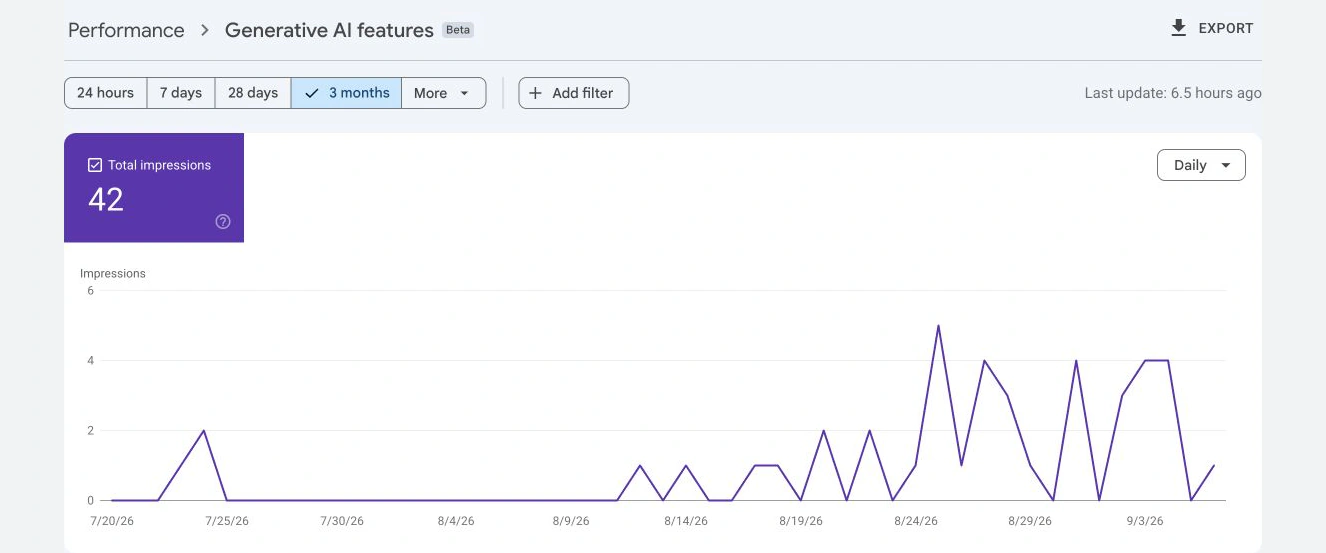
Nothing had gone missing. At least one result counted once for the site and more than once across its pages. Google’s announcement of the dedicated reports confirms that the same data also stays in the main Search performance view.
The practical lesson is simple: use the chart to describe site-wide visibility and the table to compare pages. Don’t add the page rows together and present the result as the site total.

What can the report tell you?
The report can tell you whether Google has shown links to your site in AI Search and where those impressions came from. Start with four practical questions.
- Is the site receiving any AI Search impressions?
- Which pages account for most of those impressions?
- Which countries and devices produced them?
- Did the pattern change during the date range?
Each answer can guide the next check. If one page gets most impressions, Google may find that topic useful. If the countries don’t match your market, the total may matter less to your business. A short rise after a page goes live may be worth watching, although it can’t prove the page caused the rise.
For searchDecoded, 14 of the 42 site impressions came from the United Kingdom. The report listed 22 countries in total. It also showed 35 desktop impressions, six mobile impressions and one tablet impression. The leading page was the guide to canonical tags and noindex, with 14 page impressions. Other visible pages covered an organic traffic loss, schema markup and Google Search updates.
Those figures show that Google’s AI features can display pages that aren’t about AI Search. However, they don’t show whether someone searched for canonical tags, asked a wider technical question or found the page inside a different answer.
What doesn’t the report tell you?
The report can’t show the query, the exact AI feature or what the impression meant for your business. It also leaves out the generated answer, the place of your link within it and Google’s reason for choosing the page.
That means you can’t support several tempting claims:
- An impression isn’t proof that somebody clicked.
- More impressions aren’t automatically better if they come from the wrong market or topic.
- A visible page hasn’t necessarily shaped the generated answer.
- A rise doesn’t prove that a recent edit caused the change.
- A high page count isn’t an AI Search ranking.
Google’s AI report has no Queries tab. It also has no AI-specific clicks, click-through rate or average position. The main Search performance report still shows clicks and other Web Search data, but it can’t tie a click to an AI Overview or AI Mode result.
Search Console confirms that a link appeared, but it can’t show what happened next. As searchDecoded’s guide to measuring AI citations explains, a visible link may not have shaped the answer or led to a useful visit. You need separate evidence for each step, so one AI visibility score can’t tell the whole story.
How does Google’s report differ from Bing’s?
Google counts impressions while Bing’s AI Performance report counts citations shown across the named Microsoft AI products. Microsoft says its report includes total citations, cited pages and a sample of the phrases used to find sources. Its AI Performance announcement also warns that a citation count doesn’t show placement, authority or a page’s role in an answer.
The two reports answer related but different questions. Google can show that a site link appeared in AI Overviews or AI Mode. Bing can show citations and sampled source-finding phrases across its named products. Adding those figures together would hide what each product covers and counts.
Compare patterns within each platform instead. If the same topic is strong in both reports, it may deserve a closer content review. Even then, that can’t prove the page will appear for everyone or that either product sent a useful visit.
How should you read a small AI report?
You should read a small AI report as a baseline rather than a verdict. Low counts can confirm that pages appeared, but a few impressions may swing sharply from one week to the next.
Start with five checks:
- Set a fixed date range and record when you collected the data. Search Console dates use Pacific Time rather than UK time.
- Save the property total before opening the Pages table. This stops the two counting methods from looking like a reporting error later.
- Find the pages that account for most impressions and read them before proposing an edit.
- Check whether the country and device mix fits the audience you want to reach.
- Export the report and note when you publish content or change the site.
Repeat the same view on a fixed schedule. A monthly check will often suit a smaller site because more impressions can build up between reviews. It also makes each daily move less tempting to explain.
Search Console lets you export the chart and table. Values shown as unavailable in the report become zero in the downloaded file, so keep that detail with the export. This avoids treating an unknown value as a measured zero later.
When should the data change your content plan?
The data should change your content plan only when a clear pattern links to a real audience need or a gap in the evidence. A leading page gives you a topic to inspect; it isn’t a template to copy across the site.
Ask what the page already does well. It may give a direct answer, explain a hard difference or provide facts that other pages omit. Compare that strength with pages on related questions. Google’s guidance on appearing in AI features still starts with normal Search rules and useful content rather than special AI markup.
If an important sales page gets no impressions, first check whether Google has indexed it and can show it. Then ask whether it answers the audience’s question with clear and sound facts. Don’t add guesswork-based schema markup, rewrite every heading or create near-duplicate pages simply to chase the report.
A specialist review makes sense when you need to compare many pages, separate site changes from demand or join Search Console data with analytics. The site owner should still define the markets, topics and outcomes that matter. The specialist can then test whether the pattern supports a site or content change.
searchDecoded’s AI Search services keep that distinction clear in the reporting. Search Console impressions can inform the visibility review, while useful visits and business outcomes are assessed through separate evidence where the data is available.
What should you do with the report today?
You should save a dated baseline and use it to choose the next question rather than announce an AI Search win. Record the site total, leading pages, country mix and device split. Note any product launch, new page or site change that may help explain a later move.
Then keep visibility separate from value. Use analytics to check visits and useful actions. Compare the direction of Search Console clicks without claiming that every change came from an AI feature. The same care used when traffic falls but rankings appear stable applies here: start with the measure you have and earn each claim from it.
Google’s new report fills part of a gap because site owners no longer have to rely on manual searches alone to confirm AI reach. Its limits matter just as much as its launch. Read 42 impressions as 42 recorded chances for a site link to be seen, not as 42 visits, 42 recommendations or proof of a new ranking system.