
Technical SEO
Pages indexed but no impressions? Find the real gap
A practical guide to separating Search Console reporting limits, weak search demand and ranking problems when indexed pages get few or no impressions.
An indexed page with no impressions isn’t automatically suffering from a technical fault. Indexing means Google has stored the page and can consider it for search results, while an impression is counted only when a link to your site appears in a result.
The gap between those two events can come from the report you’re viewing, limited search demand, a mismatch with what people want, stronger competing pages or a wider site problem. The safest next step is to identify which gap you have before changing the page or commissioning another broad audit.
What does indexed but no impressions mean?
‘Indexed but no impressions’ means Search Console recognises the page as indexed, but its Performance report hasn’t counted the page appearing within the dates, search type and filters you’re viewing. It doesn’t prove that Google has never shown the page, that the page is penalised or that a developer needs to fix it.
Google describes Search as three separate stages: crawling a page, indexing what it found and serving results that are relevant to a person’s query. Its guide to how Search works also says that following the technical requirements doesn’t guarantee that Google will serve a page.
| Signal | What it tells you | What it doesn’t tell you |
|---|---|---|
| Indexed | Google stored a version of the page and may consider it for results. | Whether the page is relevant or competitive for a useful query. |
| Impression | A link to the site appeared in a Google result covered by the report. | Whether someone noticed the result or found the wording persuasive. |
| Click | Someone followed a reported Google result to the site. | Whether the visit became an enquiry or sale. |
If Search Console says ‘Crawled — currently not indexed’, you have an earlier problem because Google hasn’t added the page to its searchable index. Use searchDecoded’s guide to fix ‘Crawled — currently not indexed’ instead of applying the checks below.
Confirm the zero before you diagnose the page
The first check is whether the zero belongs to the exact page and period you think it does. A filtered report, the wrong Search Console website account or a very short date range can create a different question from the one you meant to ask. Use Search Console to record four things before anyone recommends a change:
- Check that you’re viewing the website account which contains the exact page address you want to assess.
- Set Search type to Web, clear unrelated filters and use a date range long enough to judge the page in context.
- Add an exact page filter, then compare the chart total with the Pages and Queries tables rather than relying on one screen or an exported row count.
- Inspect the exact URL and record its indexed status, last crawl and the page address Google has chosen as the main version, alongside the date of the check.
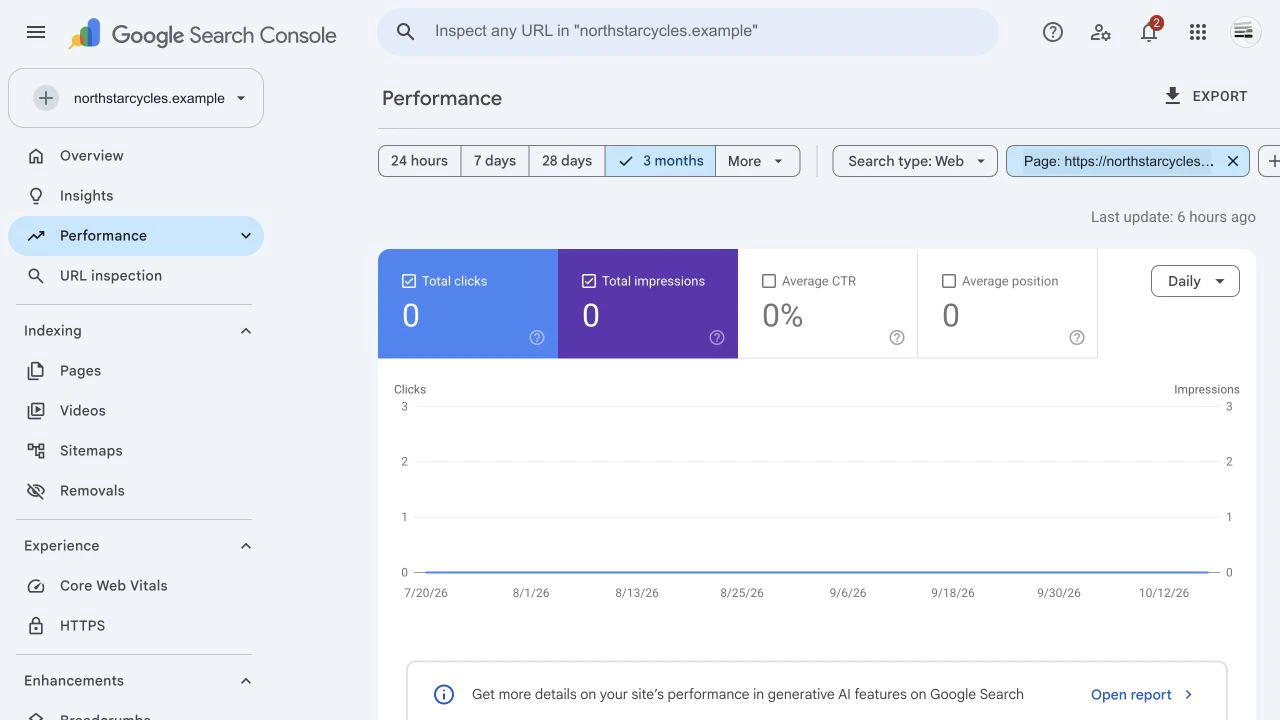
Google’s URL Inspection documentation explains that ‘URL is on Google’ means the page is eligible to appear, not that it is guaranteed to appear. The Performance report also groups and filters data in several ways, so keep the property, dates and filters with any screenshot or export you use as evidence.
Search Console query rows can help when impressions already exist elsewhere on the site, but low-volume or anonymised queries may be absent from the table. Google’s documentation on Performance report data explains how aggregation affects the totals, so an empty query table shouldn’t be presented as proof that nobody searched.
A newly published page may simply need time to be discovered, assessed and tested against searches. That explanation becomes less useful when an established page has remained flat for months, but the calendar alone still can’t tell you whether the problem is demand, relevance or competition. searchDecoded’s guide to how long SEO takes to show results explains which signs of work should appear before commercial outcomes develop.
Check whether the problem affects one page or the whole site
The scope of the pattern tells you where to look next. One page with no impressions needs a different response from a whole site whose indexed pages barely appear.
| Pattern | Best next question | What to avoid |
|---|---|---|
| One new page has no impressions. | Does the page target a real search need and has Google had a reasonable chance to assess it? | Repeatedly requesting indexing when nothing about the page or its support has changed. |
| One established page has no impressions while similar pages do. | Does its purpose match a query and the format Google currently serves? | Assuming another technical audit will create relevance or demand. |
| A group of similar pages has no impressions. | Do those pages repeat one another or sit without useful internal links? | Editing every page before sampling the pattern. |
| Most of the site has almost no impressions. | Is the report configured correctly and can the site compete for the searches it targets? | Treating one green URL Inspection result as proof that the whole site is healthy. |
| A page had impressions and then lost them. | What changed by query, page, country, device or result type? | Diagnosing a loss as though the page had never appeared. |
A page that used to receive impressions needs a different investigation. searchDecoded’s guide to organic traffic drops with stable rankings covers that kind of before-and-after loss, while a page that never gained visibility needs a clearer reason for Google to serve it.
Check whether the page serves a real search need
Search demand is the number and pattern of searches that people actually make, and a page can’t earn many impressions for a question hardly anyone asks. A technically sound page about an internal product name, an invented phrase or a service described in supplier language may be indexed correctly while matching little real demand.
A good search specialist should start by asking what the page is meant to achieve for the business and which customer problem it should answer. You’ll know which products, services or decisions matter commercially and how customers usually describe them, giving the specialist a real need to investigate rather than asking them to find a purpose for a page after it has been written.

A useful search analysis should then establish whether people look for that need, which wording represents it and what type of result Google favours. Your part is to decide whether the page answers a recognisable customer need and whether that need matters to the business; a specialist can validate the query wording, result format and competition without turning the page into a list of loosely related keywords. If the current results answer a different need, rewriting a title tag around the same phrase won’t correct the mismatch.
Check whether the page can compete
A page can be indexed and relevant to a real search without being strong enough to appear prominently. Google still has to choose between pages that could answer the same need, so technical eligibility is only the starting point. Google says its ranking systems try to return relevant and useful results, which means a specialist should compare the page with the current results before recommending changes.
Compare what Google already serves
A useful comparison should explain practical differences such as:
- Does the result set favour a service page, product list, guide, tool or local result?
- Does your page answer the same need near the start without making the reader work through background first?
- Does it provide specific experience, evidence or detail that the competing pages don’t?
- Can a visitor understand who the page is for and what useful action follows?
- Do relevant pages on your own site link to it with wording that explains its purpose?
Check whether the page offers enough value
This isn’t a word-count contest. Google’s people-first content guidance asks whether content provides original information or a substantial and useful description of its subject, while a longer page can still miss the reason someone searched. The useful question is whether the page gives someone a stronger reason to choose it than the alternatives.
Check whether the site supports the page
Internal links also help search engines and people understand which pages matter and how topics connect. A page that appears only in an XML sitemap, a file that lists website addresses for search engines, may be indexed while the site gives little other context about its role. You can identify the products, services or information that naturally relate to the page. A specialist or whoever manages the website can then assess and add links where they create a genuine next step for the reader.
Know when the evidence points back to a technical problem
The evidence points back to technical work when the live page and Google’s indexed record disagree, an important group of pages changes together after a website-wide layout or code change, or the site sends conflicting signals about which version of a page should appear. A broad pattern across the site also justifies checking security issues, manual actions, server availability and recent platform changes before rewriting individual pages. Ask for a small evidence pack rather than a long list of crawler warnings. It should:
- Provide the exact affected page sample and the date range used.
- Show the current indexed state and the page address Google has chosen as the main version for each sample.
- Separate pages with no measurable demand from pages that should compete for a verified search.
- Compare affected pages with similar pages that do receive impressions.
- Name the first supported cause and the smallest change that would test it.
A specialist should be able to explain why a finding could prevent or weaken visibility and what result would confirm the proposed fix. If the evidence spans page templates, signals telling Google which page version is the main one, or server behaviour, searchDecoded’s technical SEO services can trace the pattern and define the work without treating every audit warning as equally urgent.
What should you do next?
Your next step is to classify the gap before changing the website. Confirm the report, inspect the exact URL, decide whether the pattern affects one page or many, and explain the customer need the page should serve. A specialist can then test demand, query fit, competition and technical conflicts before recommending more work.
An indexed page can be technically eligible and still have no strong reason to appear for a useful search. More technical work is appropriate when the evidence reveals a technical conflict, but it can’t create customer demand, distinctive value or competitiveness on its own.