Technical SEO
Why is Direct traffic so high in GA4?
Understand why Direct traffic can spike in GA4 and how visits, source data and suspicious activity help you decide whether action is needed.
A spike in Direct traffic in Google Analytics 4 (GA4) can have three broad explanations:
- More visits really arrived without a recognised source.
- Analytics lost information that would normally identify some visits.
- Unusual activity inflated the figures.
Check which pages gained Direct traffic, whether another source fell at the same time and what happened to enquiries or sales. Those clues can quickly tell you which explanation deserves attention.
A spike concentrated on pages promoted through an event, email or offline campaign can fit genuine new interest. Direct traffic rising as another source suddenly falls can point towards lost source information, while a burst of visits to unusual pages with little meaningful activity may warrant a check for automated or internal traffic. The pattern won’t identify every visitor, but it can narrow the problem enough to avoid changing marketing spend for the wrong reason.
What does Direct traffic mean in GA4?
Direct traffic means GA4 hasn’t identified a clear referral source for the traffic it places in that category. Someone typing your web address or using a bookmark is one possibility, but Google also lists missing campaign information and links from offline documents among the possible reasons.
A referral source tells Analytics where a visit came from, such as another website. Campaign tags add information to marketing links so Analytics can recognise their source or campaign. Missing source information can therefore make the report less specific without stopping someone from reaching your website.
Referral information
Someone follows a link from another website.
Information carried: the referring website, when the browser supplies it.
Campaign tags
Someone follows a tagged email link.
Information carried: labels in the link, such as utm_source=newsletter.
No new source information
Someone types your web address into their browser.
Information carried: no new referral or campaign label.
A visit without new source information won’t always appear as Direct traffic because Analytics can sometimes retain an earlier non-direct source. Google’s explanation of Direct traffic describes the category, but the surrounding data is needed to explain a particular spike.
Has Direct traffic actually increased?
Direct traffic has actually increased only if its count has risen. Its percentage can increase simply because other traffic fell.
Consider this hypothetical example:
| Measure | First period | Second period |
|---|---|---|
| Direct traffic visits | 100 | 100 |
| Other visits | 900 | 400 |
| Total visits | 1,000 | 500 |
| Direct traffic share | 10% | 20% |
Direct traffic’s share has doubled from 10% to 20%, yet the number of Direct traffic visits hasn’t changed. The useful question in this example is why 500 other visits disappeared.
The reverse is possible too. Direct traffic visits can increase while their share falls because another source grows faster, so compare the count and percentage before treating the chart as evidence of growth.
What can the pattern around the spike tell you?
The date and landing pages behind the spike often provide the most useful clues. If Direct traffic rises on pages promoted through emails, documents, QR codes, events or recommendations, compare the timing with those activities and with genuine enquiries or sales. A close match gives you a route to investigate, particularly if campaign links weren’t tagged consistently.
A different pattern appears when Direct traffic rises as another reported source falls on the same pages. That can point towards lost source information, especially if the change begins around a website or tracking update. The next useful check is whether the affected links and journeys still pass the source information Analytics expects. searchDecoded’s investigation into ChatGPT traffic appearing as Direct traffic covers one specific incident where missing link tags complicated attribution.
One published example shows why this matters: in newage.’s case study for Calista, Direct traffic’s share fell from about 80% to 48% after a tracking change. This is the supplier’s before-and-after account for one business, not a ranking of common spike causes or proof that the same change would help your website.
Consent changes need separate treatment. They can affect which visits are measured and whether estimated data is available, but denied consent doesn’t simply turn every unmeasured visit into Direct traffic. Google’s behavioural modelling guidance explains when modelling may be available.
Unusual traffic can produce another recognisable pattern. A sudden cluster of Direct traffic reaching unexpected pages, from unusual locations or with little meaningful activity gives you grounds to check for automated or internal traffic. Those characteristics aren’t enough to classify visitors as bots, and Google automatically excludes known bots, so exclusions should follow a closer check rather than the location or engagement figure alone.
Make sure the reports answer the same question
GA4 calls a visit a session. Its ‘Traffic acquisition’ report shows where sessions came from, while ‘User acquisition’ shows how someone first found your website. Someone could first discover you through Google and return later through another route, so the two reports can legitimately show different source patterns.
User acquisition
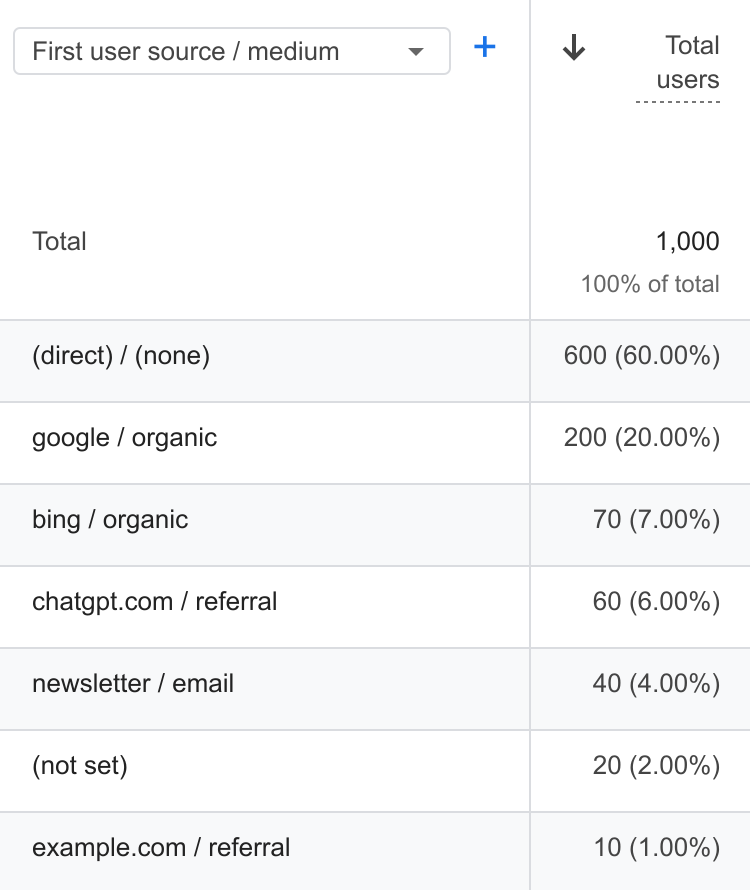
Traffic acquisition
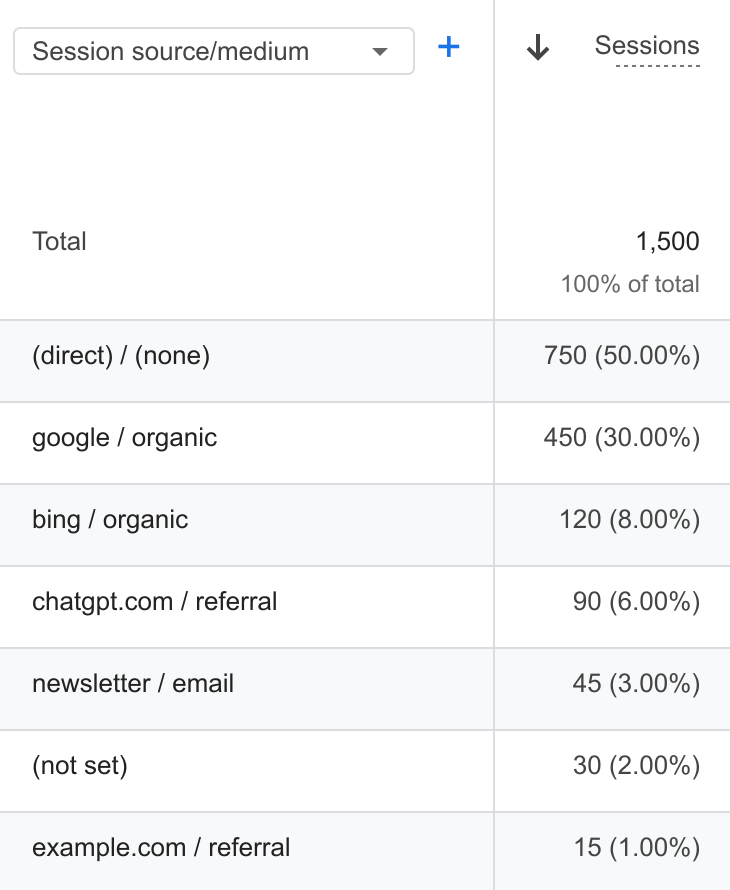
Google’s guide to traffic-source scopes explains that distinction. Sales and enquiries can add another layer because credit for a result may involve earlier interactions, so new users, sessions and credited sales shouldn’t be compared as though they measure the same thing.
What should you do about high Direct traffic?
High Direct traffic alone isn’t a reason to increase or cut marketing spend. Start with the count, affected landing pages, movement in other sources and genuine business results, because together they separate several useful courses of action.
Better business results after a campaign give you a reason to check whether its visits are being identified before reallocating the budget. A matching rise in Direct traffic and fall in another source on the same pages calls for a link and measurement check. Falling visits and genuine enquiries need attention as a business problem even while their source remains uncertain. Suspected automated traffic needs validation before filters or blocks are applied.
There isn’t a universal ‘good’ Direct traffic percentage. A high percentage can be perfectly compatible with useful reporting if you understand enough of the surrounding traffic to make the decision in front of you, while a lower percentage isn’t an improvement if it only reflects a different classification.
The GA4 Direct traffic diagnostic checklist provides the detailed reporting, campaign, consent and website checks when the first comparison doesn’t settle the question. Historical source information that was never recorded may not be recoverable, but fixing a measurement problem can make future reporting more useful. Where the pattern points towards a website or measurement fault affecting search reporting, a technical SEO review can help establish what changed and what needs fixing.